About the investment details panel
The investment details panel in the  Investments section shows details about the selected investment item. Items can be categories, sub-categories, line items, or placeholders.
- Details
Shows basic information and attribute values for the investment.
- Strategy (previous panel only)
Displays objectives defined with Strategic Planner.
- Alignment (previous panel only)
Shows your alignment score and recalculates as you update your investment plans.
- Activities
Lets you connect activities from Uptempo Campaign Management to the investment and manage fund allocation to connected activities.
Open an investment's details panel
Go to the
Investments section.In the Hierarchy column, click
 Open Panel on the investment category, sub-category, or line item whose details you want to view.
The investment details panel opens.
Modernized panel
Budgets without Strategic Targets, Impact Modeler, or Strategic Planning Insights show the modernized details panel:
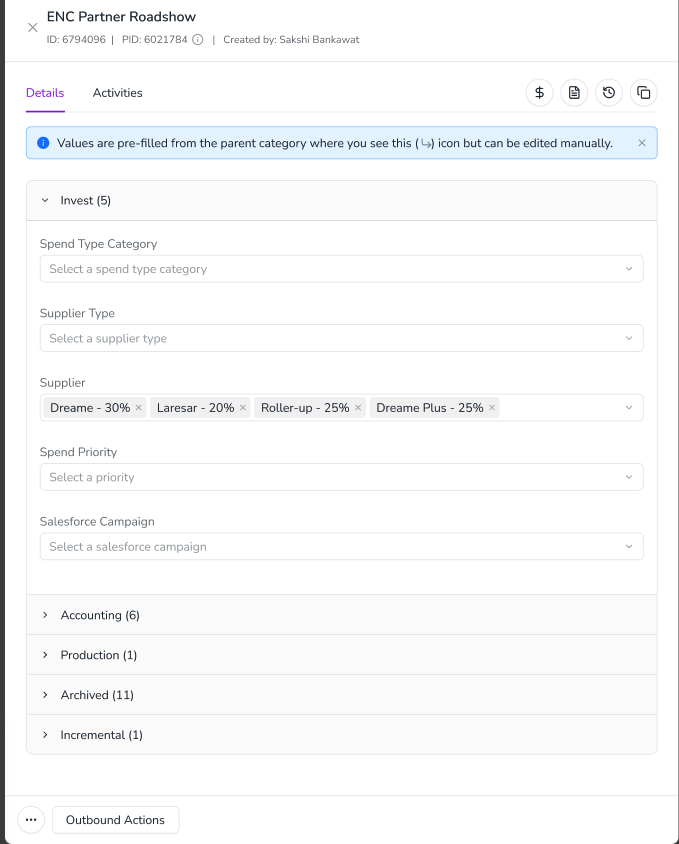
Uptempo ID and Persistent ID
Uptempo ID
Marketing data typically spans multiple systems, including CRMs, procurement tools, finance ERPs, and digital marketing platforms. This makes it difficult to connect all data points for comprehensive reporting.
Uptempo Financial Management automatically generates a unique Uptempo ID for each item when it’s created. These IDs are assigned to budget folders, sub-folders, investment plans, and all investment items (categories, sub-categories, placeholders, and line items). You can find an item’s ID on its Roll-Up and details panels. It’s named after the item type, for example Line Item ID or Investments ID.
You can use an item’s ID at three levels:
Budget hierarchy: Connect it to other planning tools.
Investment category or sub-category: Tag it to POs with multiple lines, or to parent campaigns with multiple programs or children.
Line item: Tag it to individual PO line items, transactions, campaigns, or projects.
Persistent ID
When an investment category, sub-category, or line item is copied for the first time, Financial Management also assigns it a Persistent ID that matches the investment item's original Uptempo ID. The Persistent ID provides a consistent reference ID across multiple years, so you only need one ID across systems year over year.
Whenever you copy an investment item from one year to the next during rollover, the copy receives a new unique Uptempo ID (specific to the new budget year), but retains the same Persistent ID as the original it was copied from. This means that the same Persistent ID links the original investment item to all of its copies. Investment items that share a Persistent ID are still unique, and don't affect each other: changing a value in one line item doesn't affect any other line item with the same Persistent ID.