Activity hierarchy configuration overview
What is the activity hierarchy?
In Uptempo, you create activities to track the work, investments, and deliverables in your marketing plans.
The activity hierarchy defines how these activities work, and how they relate to one another. As an administrator, you set up your activity hierarchy by configuring three elements: activity types, activity type groups, and activity rules.
Activity types and type groups
What are activity types?
Activity types are templates for the different kinds of marketing activities that your organization performs. Whenever a user creates a new activity in Uptempo Campaign Management, they begin by selecting the activity type. This tells the system what kind of activity to create, and where the user is allowed to place the new activity in the activity hierarchy.
As an administrator, you set up various activity types to represent:
Levels of your activity hierarchy: for example, activity types that represent different kinds of campaigns, like Brand Awareness Campaign or Content Marketing Campaign.
Specific marketing tactics or initiatives: for example, In-Person Event, Digital Advertising, or Social Media.
What are activity type groups?
If you have a number of similar activity types, you can collect them into activity type groups for easier management. For example, you might use an activity type group called Content Marketing to group activity types like Whitepapers, Infographics, Videos, Podcasts, etc. Like activity types, you can attach attributes to an activity type group: when you do this, all activity types within the group inherit the group's attributes, reducing configuration effort.
Using activity type groups is optional. However, we strongly recommend using activity type groups for a better user experience when creating activities.
When a user creates a new activity, they begin by selecting the activity type on the first page of the activity setup assistant. The selection menu for the activity type consists of two columns — the user first selects the group in the left column, then selects a type within the group in the right column: 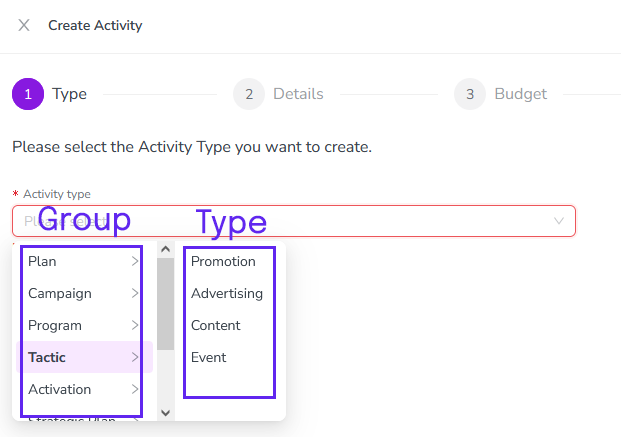
Activity rules
Activity rules define the structure of your activity hierarchy. They specify which activity types (or type groups) can be parents or children of other activity types (or type groups). For example, you might set up a rule that specifies that activities of the type group Campaigns must always be children of activities of the type Plan.
By setting rules to define the relationships between your activity types and type groups, you can build an activity hierarchy that reflects and supports the way your organization plans, executes, and measures its marketing efforts.
How do I set up the activity hierarchy?
The basic process for setting up the activity hierarchy consists of three steps:
Set up activity type groups to organize your activity types. This step is optional, but strongly recommended. To learn more, see Create activity type groups.
Set up activity types to outline the structure of your activity hierarchy and the specific tactics you want to track. To learn more, see Create and configure activity types.
Set up activity rules to define the relationships between your activity types (and type groups). To learn more, see Create activity rules