Release: January 2025
The January 2025 release adds these features to the Hive9 platform:
Allow Users to Select Only Line Items on Plan Grid
Users can now exclusively select line items on the Plan Grid and hide system-generated balance entries through a new Hierarchy Viewer option, while the Budget & Cost Grid requires parent object selection for optimal performance. 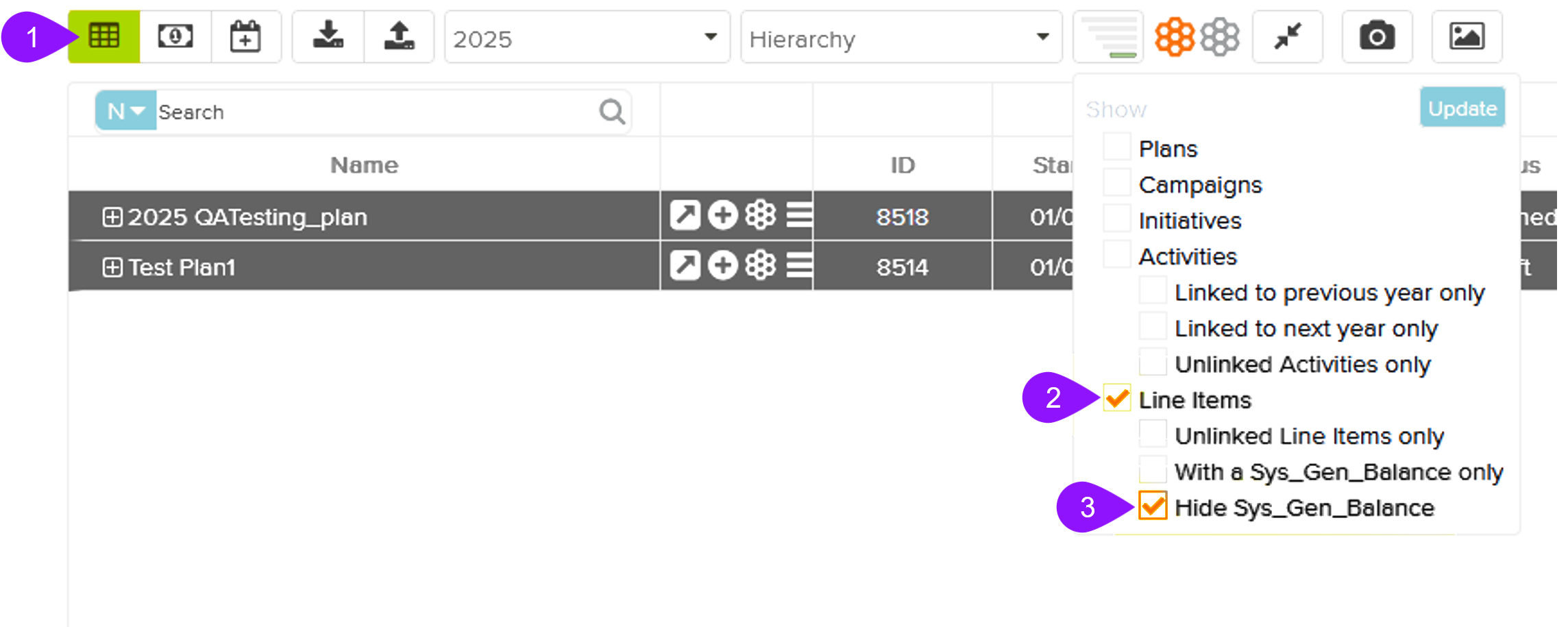
Export Transactions View from Tactic Inspection Window
Users can now export transaction details directly from any Tactic's Inspection Window into Excel, with data and columns matching the Transaction grid view shown in the Tactic Inspection Window and following standardized file name conventions. 
Reassign Objects to Other User on User Deletion
When deleting a user, authorized users can now choose how to handle the Ownership of the Hive9 objects owned by the user being deleted. They can either keep the ownership to the same user to reassign all their owned objects to another active user. This feature helps in maintaining complete data continuity while sending notifications to new owners and tracking all ownership changes in an audit trail.
Convert Transactions Screen to Kendo Grid
The Transactions grid has been augmented with Kendo UI components to facilitate seamless interactions for bulk operations and smoother handling of large data sets while maintaining familiar functionality.
Bulk Linking Transactions with Single Line Item
A user-centric bulk transaction mapping feature introduces an intelligent Map Bulk Transactions button that activates upon multiple checkbox selections in the transaction grid. Through an innovative dual-section popup interface displaying synchronized transaction and line item grids alongside the Plan Picker, users can efficiently distribute line item amounts across multiple transactions while sophisticated validation ensures data integrity by preventing duplicate mappings and invalid amount allocations.
To learn more about the new features, read the full Hive9 User Guide.