What's new: 2025.3
Discover all the new Uptempo features introduced with the 2025.3 release, available from March 26, 2025.
For details about bugs that have been fixed this month, see the bug fixes page.
Campaign Management: Activities
Compare Activities by Actual ROI
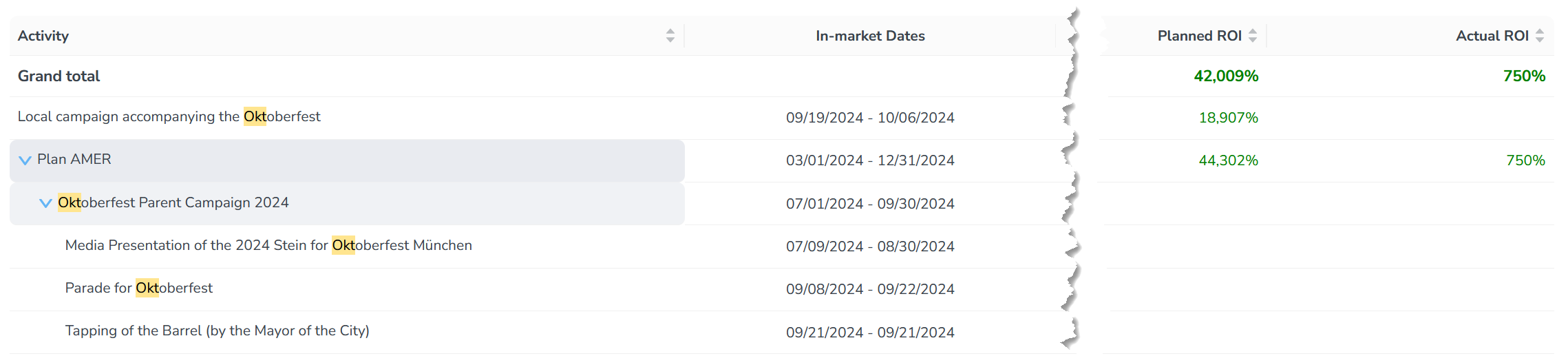
The Activities Summary display mode now features an Actual ROI column displaying calculated return percentages with color-coded formatting (green for positive, red for negative) to rapidly identify high-performing investments versus underperforming activities. This enables you to make data-driven decisions about resource allocation based on demonstrated financial performance.
Activity Name Updates via API
As a developer you can now programmatically update activity names through our APIs. This enhancement ensures consistent activity hierarchies when names change in Uptempo or in connected applications. Previously, when an activity name changed in an integrated system, administrators had to manually update these names in our platform. Now, these updates synchronize automatically, saving time and ensuring naming consistency.
Persistent Activity Column Width
When you change the width of the Activity column in the Timeline display mode, the custom width you set is now saved in the browser's local storage. This means that the Activity column will now stay the same width every time you refresh or reopen the Timeline display mode in the same browser — even if you closed the tab or browser window.
Track and Compare Actual Performance Metrics for Activities
Track your campaign performance with intuitive KPI comparisons and enhanced visuals. You can now see how Actual results stack up versus Planned through every level of your campaign hierarchy. Choose monthly or quarterly views for granular insights, and quickly spot positive trends with our new improvement direction indicators.
Learn more about how to track and compare actual performance metrics for activities
Campaign Management: API
Activity Impact Planned API
The new API endpoint provides key metrics for impact-based activities, providing detailed quantity and revenue projections across multiple funnel stages. With this dedicated feature, enterprise systems can easily retrieve planned impact values using a simple GET request, thus enabling seamless data integration and performance analysis.
Read/Update API for Actual KPIs
This feature allows you to automatically update KPI values through integrations by connecting with external data sources. It allows daily data capture while displaying monthly aggregates in the interface for better business usability. Visual indicators show when values are updated via API.
Financial Management: Investments
Enhanced Filtering Capabilities for Budget Allocation Tracking
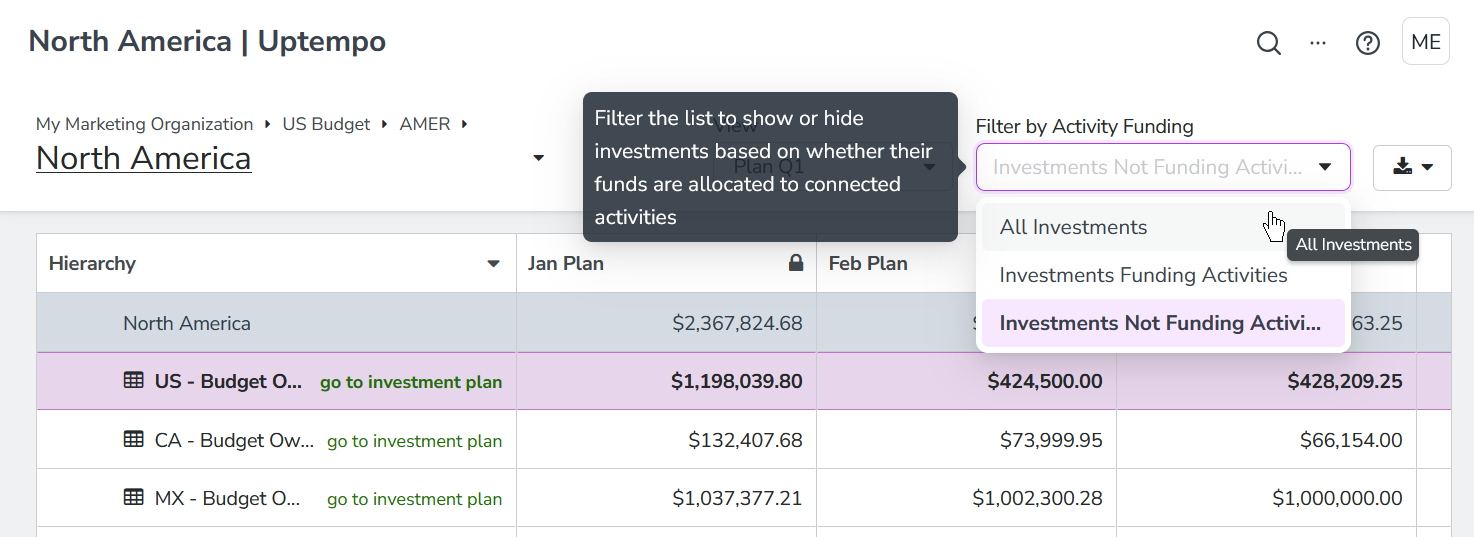
We have added more filtering options to the investment hierarchy table to give you better insight into activity funding and funds allocation. Previously, you could filter the table to see only investments that are connected to activities. With the new and expanded Filter by Activity Funding options, you can now additionally see the specific amounts allocated to connected activities. And the opposite view is now also available, allowing you to see investment amounts not yet allocated to any activity. These new filter options provide a more complete view of how your investments support activities, helping you to manage budgets and make informed decisions.
Learn more about how to filter investments by activity funding