Rules for connecting investments
In Uptempo, you can connect investments to your activities. However, because both activities and investments are organized into hierarchies, not all activities can be connected to all investments. To prevent funding conflicts and invalid connections, Uptempo automatically applies the following rules whenever activities and investments are connected.
Rule 1: An activity can only be connected once within a path of the investment hierarchy
There can only be one connection between an activity and any investment within a given path of the investment hierarchy.
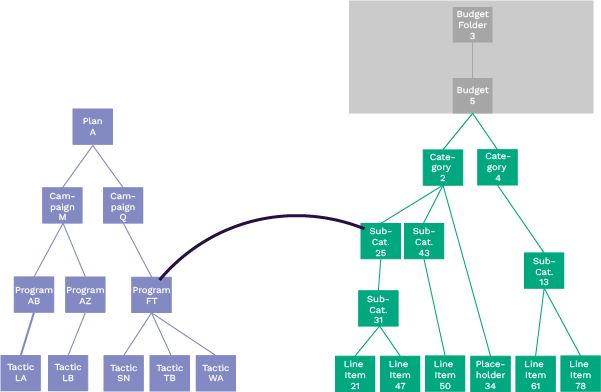
In the following example, the Program FT in the activity hierarchy (left) is connected to Sub-Category 25 in the investment hierarchy (right):
This creates the following connected paths between the activity and investment hierarchies:
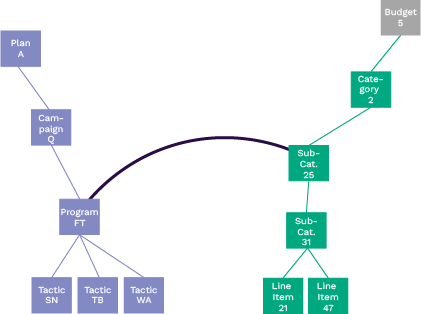
Although the activity Program FT can have connections to multiple investments, it can't be connected again anywhere within the path of the investment hierarchy that Sub-Category 25 is in. For example, it can't be connected to Line Item 21, or Category 2, as they are within the same path as Sub-Category 25, which it is already connected to.
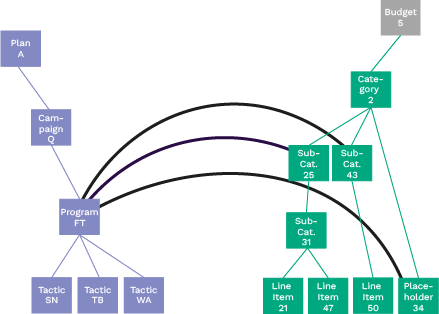
However, Program FT can be connected to multiple investments as long as they are in different paths of the investment hierarchy, as shown here:
Rule 2: Connections must follow ancestor-to-ancestor and descendant-to-descendant relationships
When a path in the activity hierarchy is connected to a path in the investment hierarchy, additional connections must respect the relative positions of activities and investments in their respective hierarchies.
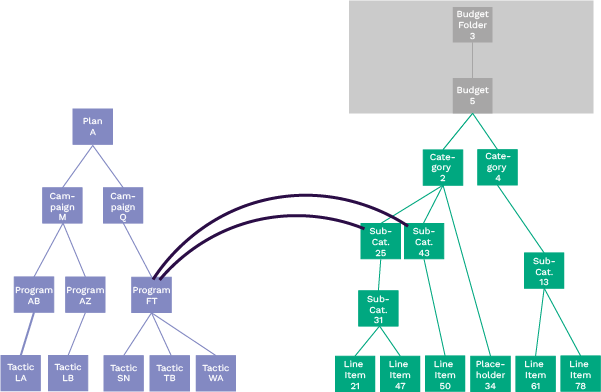
In the following example, Program FT in the activity hierarchy (left) is connected to both Sub-Category 25 and Sub-Category 43 in the investment hierarchy (right):
This creates the following connected paths between the activity and investment hierarchies:
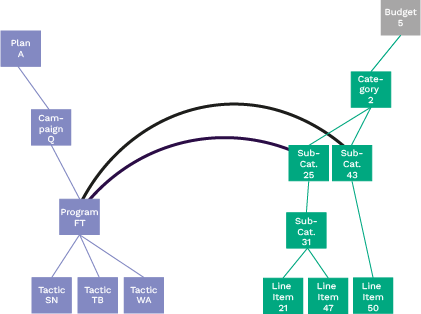
Because of these existing connections, Campaign Q (an ancestor of Program FT) can only be connected only to ancestors of Sub-Category 25 and Sub-Category 43.
For example, Campaign Q can be connected to Category 2:
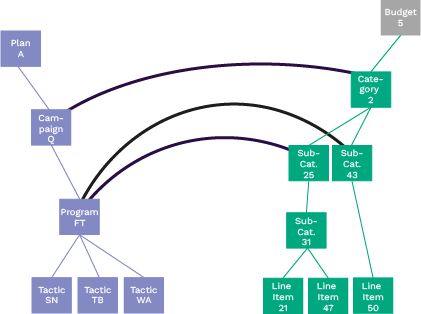
But connecting Campaign Q to descendants of Sub-Category 25 or Sub-Category 43 (such as Sub-Category 31 or Line Item 50) is not allowed.
Similarly, descendants must connect only to descendants. As a result, Tactic TB (a descendant of Program FT) can be connected only to descendants of Sub-Category 25 and Sub-Category 43. Valid connection targets include:
Sub-Category 31
Line Item 21
Line Item 47
Line Item 50
One valid configuration is shown in the following example:
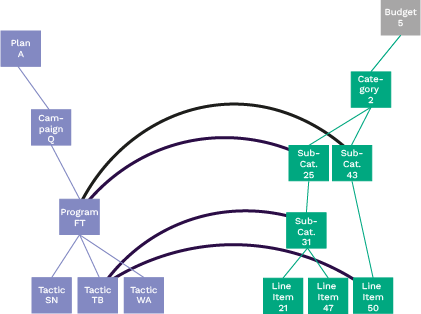
- Connected paths restrict further connections
After the initial connection between an activity hierarchy path and an investment hierarchy path is made, all additional connections must stay within those paths. Connections outside the established paths are not allowed.
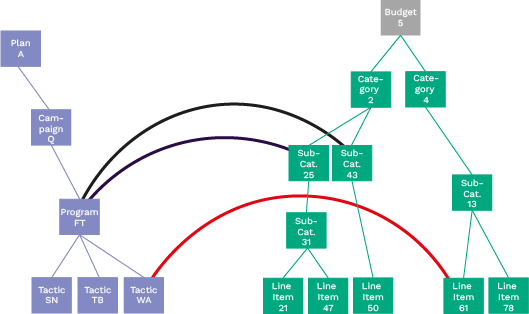
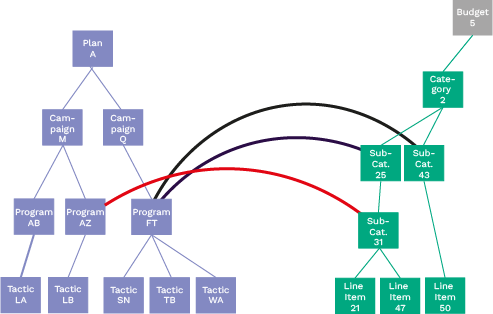
In the following examples, the red lines represent connections that are not allowed because the initial connections for Program FT defined the connected paths within the investment plan:
Campaign Q can't be connected to another path within the Budget 5 plan:
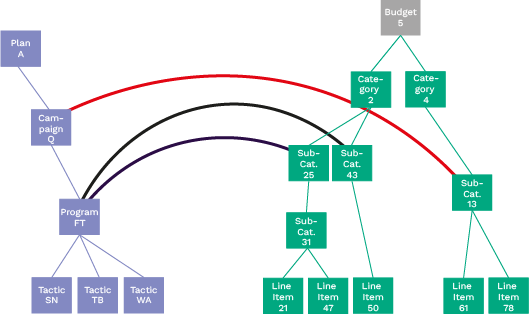
Tactic WA can't be connected to Line Item 61:
Program AZ (a sibling of Program FT) can't be connected to Sub-Category 31:
As a result, the initial connections between activities and investments are critical: they determine which paths are available for all subsequent connections.
Rule 3: The highest connected activity can be connected to a different investment plan
Within a single investment plan, the first connection determines the available paths for subsequent connections, as described in Rule 2. However, you can also make connections to additional investment plans.
Only the highest connected activity in the activity hierarchy can be connected to another investment plan.
In this example, Campaign Q is the highest connected activity and can therefore be connected to a different investment plan:
In this example, there are no connections above Program FT, so it is the highest connected activity and can be connected to another investment plan: