What's new: 2026.2
Discover all the new Uptempo features introduced with the 2026.2 release, available from February 25, 2026.
Campaign Management: Activities
Improved visibility for in-market date errors
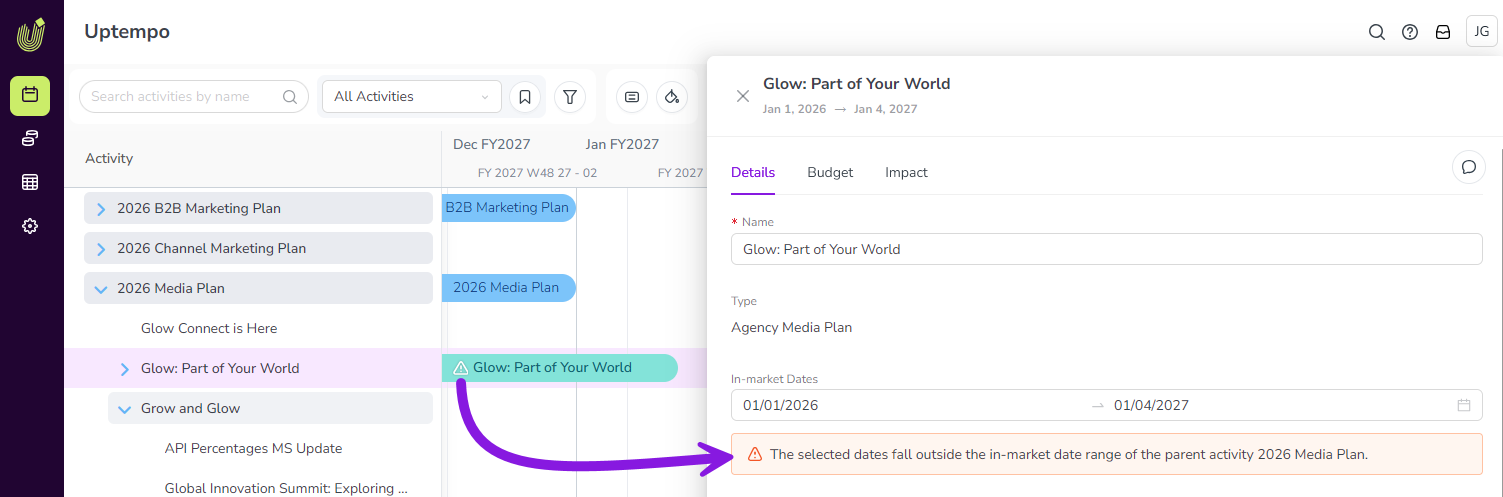
To help ensure that in-market dates are set correctly on all activities, Uptempo now displays a warning when a child activity's in-market dates fall outside the parent activity's date range.
Highly visible warnings: Warnings are displayed in the activity setup assistant, in the activity details panel, and on activity bars on the Timeline, making it easy to identify activities that have incorrectly set in-market dates.
Improved data consistency: Whenever users set in-market dates, immediate feedback helps them to correct errors right away, ensuring accurate and consistent data entry.
Support for saving the Timeline Scale setting in views
When you save your Timeline display settings as a view, your current Timeline Scale setting is now also saved to the view.
Whenever you select a view again later, the saved Timeline Scale (for example, Days, Weeks, Months, etc.) is now also restored alongside all other saved display settings, ensuring a more consistent experience.
→ Learn more about saving Timeline display settings as views
Financial Management: Budgets
Copy activity connections in rollovers
The rollover process now supports copying activity connections on investments.
Keep Connect to Spend connections: The new option lets you keep existing connections between investments and activities from the current fiscal year when you roll over to a new fiscal year.
More streamlined rollovers: Use this option to save time and effort during rollovers, as you no longer need to manually reconnect investments to activities in your new fiscal year hierarchy.
Financial Management: Investments
Investment Persistent ID now displayed by default
The Persistent ID for investments, a key data point for rollovers and monthly reconciliation, is now easier to find.
Previously, the Persistent ID was easy to miss: it was hidden by default and required an extra click to be displayed. Now, whenever you open an investment category, sub-category, or line item's details panel, the Persistent ID is visible right away, making it easier to access this important data when you need it.